Appearance
Architecture
How the agent talks to AIMO
AIMO’s cloud hosts the web UI and coordinates work. The AIMO Agent runs only in your environment, usually as a container you control. There is no network path from AIMO to your database; raw rows do not leave your network. For organizations that need everything inside the perimeter, the whole platform—cloud side included—can be deployed on-prem, with an LLM you supply.
- Outbound session — The agent dials out to AIMO and holds a single long-lived, encrypted connection (a WebSocket over TLS). AIMO never connects in. You do not expose databases or the agent to the public internet for normal operation.
- Job requests — Over that one channel, AIMO pushes work to the agent as a fixed set of job types (connection tests, schema analysis, profiling, monitor calculation, validation—not arbitrary code). Anything that does not deserialize as a supported job is rejected. See Operations.
- Aggregates and metadata only — What flows back are structured summaries and monitor outputs: schema descriptions, per-column statistics, monitor result values, row counts, validation outcomes—plus progress, logs, and heartbeats. Any sampled rows are read and summarized on the agent; the samples themselves do not leave your network.
Inside your perimeter, the agent connects to your database for profiling and checks; that traffic stays local. The agent runs every client-database query in autocommit and never writes to your data.
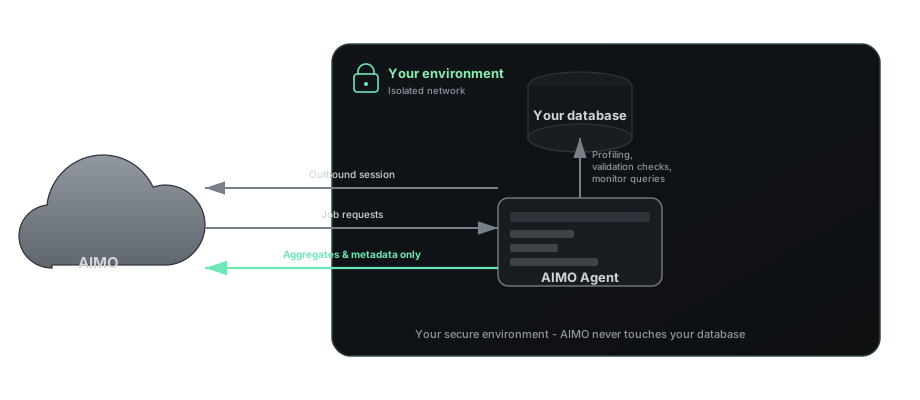
End-to-end flow
This matches Getting started step by step:
- Sign in — Web UI (hosted with AIMO’s cloud) for agent registration, connections, analysis, and table onboarding.
- Register an agent — Pair the agent with your account using a registration token; tooling writes identity material and usually
aimo_agent.sh. See Registration. - Add database credentials — Secrets go through the agent, not the browser—typically
./aimo_agent.sh addorpython -m aimo.agent.cliwith the same environment. The agent encrypts them locally before they are stored; AIMO holds only the ciphertext and ships it back in each job payload for the agent to decrypt on its side at run time. See Agent CLI. - Run the agent process — A long-lived
startprocess (e.g../aimo_agent.sh start) keeps the outbound channel open so AIMO can push Operations jobs when you analyze, calculate monitors, or validate artifacts. If the connection drops, the agent reconnects and resumes; results buffered while offline are retried until delivered. - Analyze, select tables, accept — You analyze the connection, choose tables, then accept. AIMO assigns monitor definitions; see Monitors.
After accept, the heavy pipeline steps—deeper analysis, time-block planning, monitor generation, outlier-model training, and inference—run on AIMO workers in the cloud, using the aggregates and artifacts the agent returned, never raw row exports. The agent keeps doing only database-facing work: it queries your database for profiling, monitor calculation, and validation, then sends the results back. See Security for the trust boundaries.
See the product site for pricing and positioning.